Change the Moonpool theme, language and transparency
Theme, language and transparency are set in the Settings window. All three apply instantly to every open Moonpool window.
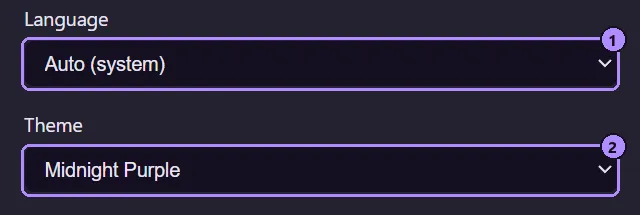
- Language picker.
- Theme button. It shows the current theme’s name and opens the theme browser.
Themes
Section titled “Themes”The theme browser is its own window. It has one preview card per theme, each drawn in that theme’s own colors (text, panel, input, button, status dots, the gauge gradient and the 16-color terminal set), grouped as Core, Neon, Warm, Cool, Greens, Neutral, Light, Blush, Bright, Light pastel and Pastel. Click a card to apply it: every open Moonpool window changes at once and the choice is saved. The window stays open so you can compare; press Esc to close it.
There are 68 themes plus Auto, and about half of them are light. Theme names are proper nouns and are not translated; only Auto (system), Dark and Light are.
Auto (system) follows the operating system’s light or dark preference and switches live when the OS does. Any other choice is fixed. The terminal’s 16 ANSI colors follow the theme too.
If you saved a theme from an earlier version, it is kept. A saved name Moonpool no longer knows falls back to Auto. Some labels differ from before (for example Matrix is now labelled Terminal, Nord is Arctic, Dracula is Nocturne, Gruvbox is Retro and Solarized is Solar); the saved choice itself is unchanged.
The theme is stored in the webview’s localStorage, not in settings.json. If storage is
unavailable it falls back to Auto.
localStorage key: moonpool.themeLanguages
Section titled “Languages”Auto follows the OS language. Otherwise pick one of 14, each shown in its own language:
English, Deutsch, Español, Français, Italiano, 日本語, 한국어, Nederlands, Polski,Português (Brasil), Русский, Türkçe, 简体中文, 繁體中文The picker applies instantly to the hub and the other windows. The choice is saved as
locale in settings.json.
Transparency
Section titled “Transparency”Background transparency makes the window background see-through, from 0% (solid) to 90%.
- Hovering the pointer over a window wakes it to fully opaque at once. When the pointer leaves, it fades back to your setting over about 2 seconds.
- Terminals follow the same tint rather than adding their own.
- Each window (hub, Settings, About, the app editor and the theme browser) applies the setting itself, and Settings updates the others live as you drag the slider.
UI scale
Section titled “UI scale”Zoom the whole interface with Ctrl + mouse wheel. There is no keyboard zoom. See Shortcuts and zoom.
See also
Section titled “See also”Moonpool is free software from FasterDB