Find and manage Moonpool session logs and the debug log
Moonpool keeps four kinds of output:
| Kind | Where | Kept |
|---|---|---|
| Session log | cli-output\<id>\<session-start-ms>.log in the config folder |
This session always; older sessions per the retention rules below |
moonpool.log |
The config folder | Only written while Log debug info to a file is on |
| Dump | Where you ask, or the session log’s own path | Until you delete it |
| Scrollback | In the terminal tab | 10,000 lines, until Moonpool quits |
The config folder is listed in Where the config lives.
Session logs
Section titled “Session logs”Everything an app prints in its terminal is also written to a log file:
<config folder>\cli-output\<id>\<session-start-ms>.log-
One file per app per Moonpool session. The number is when that Moonpool process started.
-
Stopping and relaunching an app keeps appending to the same file. A dim divider line marks where each new run begins, and the same marker shows in the terminal tab:
1767225600000.log Local: http://localhost:5173/---------- restarted 2026-10-05 09:14:02 ----------Local: http://localhost:5173/ -
Characters in an
idother than letters, digits,-and_become_in the folder name. So.becomes_. Letters outside English are kept. -
The file holds the raw terminal output, including color codes. Use a dump for plain text.
Reopening an app’s tab replays this session’s log, so you see its earlier output.
Retention
Section titled “Retention”Retention only concerns logs from earlier Moonpool sessions. It runs when you launch an app, for that app’s folder only, oldest first.
Keep app output logs between sessions (cliLogging) |
What happens to earlier sessions’ logs |
|---|---|
| off (default) | Deleted at the app’s next launch. |
| on | Kept until the folder’s total size passes Log retention per app (logRetentionMb, default 10 MB), then the oldest are deleted. |
The current session’s file counts toward that total, but it is never deleted or truncated. So one very large current log can push out every older one.
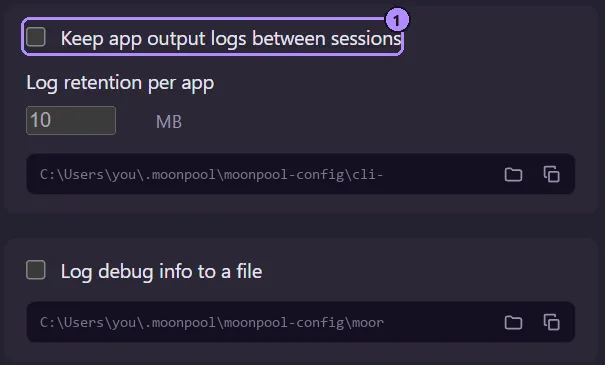
- Keep app output logs between sessions is
cliLogging. Log retention per app below it islogRetentionMb.
moonpool.log
Section titled “moonpool.log”With Log debug info to a file (debugLogging) on, Moonpool appends timestamped lines to
moonpool.log in the config folder: apps.json loads, launches (with the command and folder),
control commands and errors. Turn it on before you reproduce a problem.
Reveal and Copy
Section titled “Reveal and Copy”In Settings, under each log group:
- Reveal CLI log folder and Reveal log file open the folder in your file manager.
- Copy CLI log folder path and Copy log file path put the path on the clipboard.
In a terminal tab, Copy all copies the whole scrollback as text.
The dump verb gives you a session log from a script:
& "$env:USERPROFILE\.moonpool\moonpool.exe" dump my-app C:\temp\my-app.logWith an output path it writes a plain-text copy, color codes removed. Without one it reports
the session log’s own path. An agent gets the same text, already cleaned, from
moonpool_app_output. See Command line.
Moonpool is free software from FasterDB