Install Moonpool on Windows or Linux
This page is for Windows. On Windows, Moonpool is its own installer: the download is a
single moonpool.exe. Linux has no install card or portable chooser; see
Linux.
Installed mode
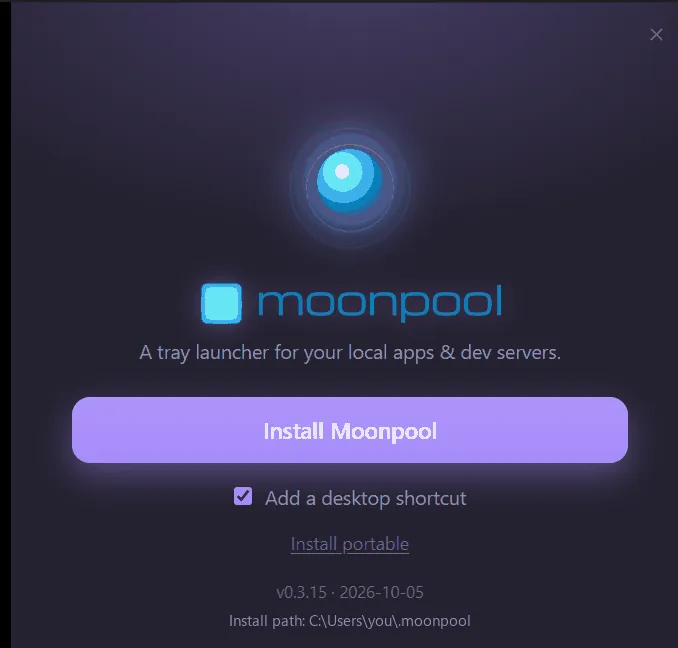
Section titled “Installed mode”Run the downloaded moonpool.exe. On first launch it shows the install card. It has three
controls: the Install Moonpool button, a desktop shortcut checkbox (on by default)
and an Install portable link.
Installing copies Moonpool into your user profile under .moonpool\, adds a Start Menu
shortcut (and a desktop one if the box is ticked), and registers an entry in Add/Remove
Programs. Then it starts the installed copy and closes. The file you downloaded stays where
it was; you can delete it. After that, launch Moonpool from the shortcut like any other app.
Everything Moonpool needs lives under that one folder: the program, your configuration, and its bundled help.
%USERPROFILE%\.moonpool\Install Moonpool… from the menu
Section titled “Install Moonpool… from the menu”On Windows the “…” menu has Install Moonpool… in both modes. It opens the same install card. From a portable copy you can install it properly. From an installed copy Install Moonpool is disabled (“Already installed”) and Install portable stays available.
Uninstalling
Section titled “Uninstalling”Use Windows Add/Remove Programs (Installed apps), or run the installed copy with
--uninstall. It is not on your PATH, so give its full path:
& "$env:USERPROFILE\.moonpool\moonpool.exe" --uninstallThis removes the Start Menu and desktop shortcuts, the registry entry, and the whole
%USERPROFILE%\.moonpool folder, including your configuration (apps.json, settings
and logs). Back up this folder first if you want to keep your configuration:
%USERPROFILE%\.moonpool\moonpool-configAny running Moonpool is stopped as part of uninstalling.
Portable mode
Section titled “Portable mode”Prefer a USB stick or a movable folder? Click Install portable on the install card and pick a folder. See Portable mode.
- Windows protected your PC: if SmartScreen blocks the installer.
- WebView2 runtime missing: if the window stays blank.
- Your first app
Moonpool is free software from FasterDB