Every apps.json field: type, default and what it does
The Edit app dialog shows the same fields under the same names. Fields that do not apply to
the selected type are dimmed in the dialog but still saved, with one exception:
stopCommand is only saved while killMode is command.
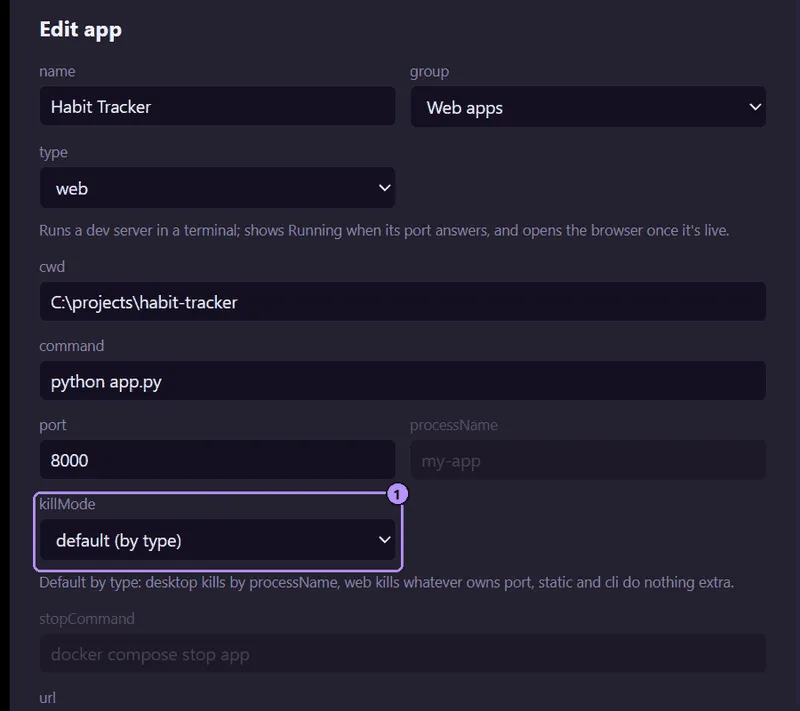
- The
killModeselect. Fields it does not use stay dimmed.
| Field | Type | Required | Used by | What it does |
|---|---|---|---|---|
id |
string | yes | all | Unique key. Letters, digits, ., _, -, not starting with -. See Overview. |
name |
string | yes | all | Label in the sidebar. Not blank. |
group |
string | yes | all | Sidebar heading the app is listed under. Not blank in a hand edit; the dialog saves a blank group as Apps. Any text; a new name creates a new group. |
type |
string | yes | all | web, desktop, static or cli. See App types. |
command |
string | all but static |
all | Run in a terminal to start the app, through cmd /c on Windows and $SHELL -c elsewhere (/bin/sh if SHELL is unset). Optional for static. |
cwd |
string | no | all with a command |
Folder the command runs in. Defaults to Moonpool’s own working folder. Supports tokens and ./. See Paths and environment. |
port |
integer, 1 to 65535 | no | any | Running while something answers on this port on localhost (IPv4 or IPv6). Read by killMode port. |
processName |
string | no | any, mainly desktop |
Running while a process with this name exists. Case-insensitive, with or without .exe, so my-app matches my-app.exe. On Linux, 15 characters or fewer. Read by killMode processName. |
mcpProcessName |
string | no | any with a processName |
Wildcard pattern for the process name of this app’s MCP server. * matches any run of characters, ? one character. Case-insensitive, matched against the whole name, and .exe is optional. A matching process counts as the app’s MCP server (the sidebar MCP sub-row) and does not need mcp as its first argument. See mcpProcessName. |
url |
string | static only |
web, static |
Page to open. Only http://, https://, mailto: and file:// URLs are opened. |
openBrowser |
boolean, default false |
no | any type with a url (the dialog dims it for desktop and cli) |
Open url automatically once Moonpool detects the app is up (see below). |
killMode |
string | no | all | Extra cleanup on Stop and Restart: processName, port, command or none. See Stop and restart. |
stopCommand |
string | no | killMode command |
Command run on Stop. Ignored in every other mode. |
env |
object of strings | no | all | Extra environment variables. The dialog edits it as one KEY=VALUE per line. |
icon |
string | no | all | Sidebar image: a file path, an http(s) URL, or a data: URI. Set it from Set icon… in the app’s context menu or by hand. |
note |
string | no | all | Tooltip when you hover the app in the sidebar. |
An entry using env and killMode:
{ "id": "api", "name": "API", "group": "Web apps", "type": "web", "command": "npm start", "port": 3000, "env": { "PORT": "3000", "NODE_ENV": "development" }, "killMode": "port"}See Find and kill the process using a port
for how port and killMode work together.
mcpProcessName
Section titled “mcpProcessName”By default Moonpool treats a process as the app’s MCP server when its name matches
processName and its first argument is mcp, such as notes-app.exe mcp. Set
mcpProcessName when the server runs under a different name: an app that watches one exe
while its MCP server is another (mog.exe mcp), or a renamed copy of the server.
The value is a wildcard pattern. * matches any run of characters (including none) and ?
matches exactly one. It is compared case-insensitively against the whole process name, and a
pattern without .exe also matches the name with .exe. An empty value counts as unset.
{ "id": "destiny", "name": "Destiny", "group": "Desktop apps", "type": "desktop", "processName": "destiny", "mcpProcessName": "destiny-mcp-*"}This matches a renamed copy such as destiny-mcp-2706210170.exe. A process that matches
mcpProcessName is the server whether or not it was started with mcp, and it never counts
as the app itself running. If the pattern also matches processName itself (for example
destiny*), Moonpool still requires the mcp argument, so the real app is never mistaken
for its MCP server. See MCP setup.
openBrowser
Section titled “openBrowser”Moonpool opens url once, when an app that Moonpool launched first reads as Running. That
needs a port or processName to detect it. Without either, Running only means the
terminal process is alive, and the browser is not opened automatically. Turn openBrowser
off if your command opens a browser itself. A static entry with no command opens url
whenever you press Launch, regardless of openBrowser.
Two apps configured with the same port are flagged in the sidebar.
An app’s icon is the first of these that exists:
- The
iconfield. icons\<id>.<ext>in the config folder, for exampleicons\site.png.- An icon file in the app’s own folder (its
cwd, or the folder of afile:///url). - For
desktop, the icon of its built or running.exe. - For
webandstatic, the site’s/favicon.ico, once the server is up. - A glyph for the type.
Most apps need no icon setting.
Moonpool is free software from FasterDB