Use Moonpool terminal tabs: open, close, copy, restart
Each app runs in its own terminal tab in the CLI pane.
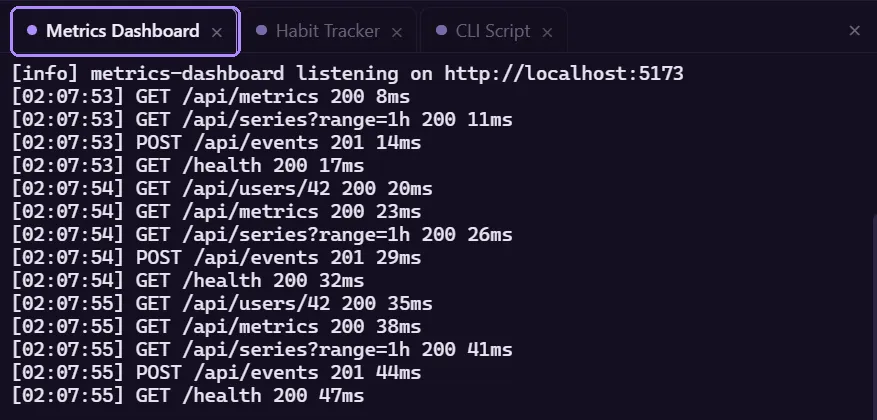
- Launching an app, or clicking its name in the sidebar, opens its tab. Clicking a name starts nothing; see App states.
- A dot on the tab is lit while the app is running.
- The x on a tab closes the tab. It does not stop the app. Click the name again to reopen the tab; it shows this session’s log.
Collapsing the pane
Section titled “Collapsing the pane”The x at the far right of the tab strip (“Hide CLI pane”) collapses the CLI pane and shrinks the window to just the sidebar. Terminals keep running and keep their scrollback.
A chevron appears beside the filter box to bring the pane back at its previous width. The chevron pulses when an update is waiting, because the update banner lives in the pane.
Copy and paste
Section titled “Copy and paste”| Action | Result |
|---|---|
| Select text with the mouse | Copied to the clipboard on release, then the selection clears. |
| Middle-click | Pastes the clipboard into the terminal. |
| Copy all button (top right, appears on hover) | Copies the whole scrollback as text. |
Scrollback
Section titled “Scrollback”Each terminal keeps 10,000 lines.
When a process ends
Section titled “When a process ends”When the process exits, the terminal prints:
[process exited]The tab stays open with its output intact. The [process exited] line is shown in your
language.
Restart
Section titled “Restart”Restart (or Launch on a stopped app) starts a new run in the same tab. The tab is rebuilt, and the earlier output of this session is replayed into it from the session log.
If the app already ran earlier in this session, Moonpool first writes a dim divider to the session log, so it shows between the old output and the new run:
---------- restarted 2026-10-05 09:14:02 ----------If the new run begins by clearing the screen, the earlier output is pushed into scrollback instead of being wiped.
Session logs
Section titled “Session logs”Everything an app prints is also written to a log file under cli-output\, one file per app per Moonpool session. Location, retention and the Keep app output logs between sessions setting are in Logs.
Moonpool is free software from FasterDB